
Turn activity into opportunity by connecting your HubSpot CRM to your social platforms so every like, comment and message flows into a single system. That system captures each interaction and makes it actionable for your team.
Key Takeaways
- Social activity is not revenue. HubSpot CRM turns engagement into signals your sales team can act on.
- Capture engagement in one place. Social Inbox and Sales Navigator bring context into the contact record so outreach is relevant.
- Tie engagement to revenue. Attribution reporting shows which interactions create opportunities and drive pipeline.
- Prioritize what matters. Lead scoring and AI surface high-intent contacts and trigger consistent follow-up.
Many sales and marketing teams are busy posting on LinkedIn, replying to comments and chasing leads, yet the pipeline doesn’t move. Activity doesn’t equal opportunity. The missing link is a system that captures social engagement, makes it visible in HubSpot, and triggers the right follow up across sales and marketing. Without that connection, you can’t see what’s working or why revenue isn’t growing.
HubSpot CRM tracks social media engagement by centralizing interaction data from LinkedIn, Facebook, and X into a single source of truth. By using HubSpot’s platform for pipeline attribution, businesses can connect social engagement directly to revenue, utilizing HubSpot AI to automate lead enrichment and shorten sales cycles
In this guide, you’ll learn how to turn social signals into measurable opportunities by using HubSpot to capture, enrich and attribute engagement across your entire revenue operation. At KLA Group, we work with B2B companies to build revenue generation systems that connect sales, marketing, CRM, and AI so you can finally see what’s working and create consistent pipeline movement.
How Does HubSpot Capture Social Media Engagement?
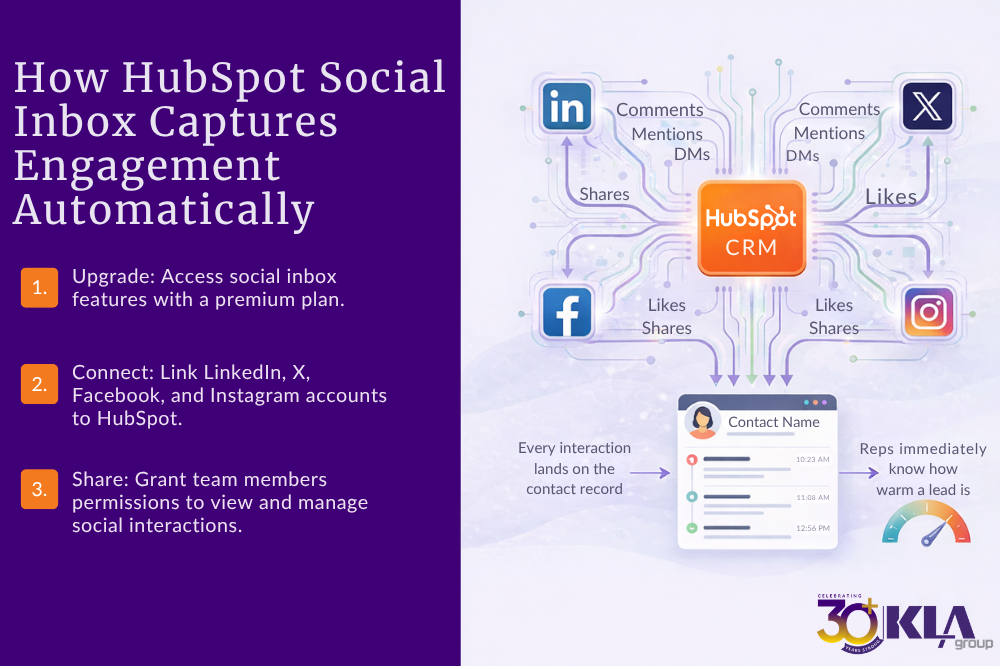
HubSpot’s Social Inbox pulls comments, mentions and direct messages from Facebook, Instagram, LinkedIn and X/Twitter into one place. Instead of living on each platform, every interaction lands on the contact record so your reps immediately know how warm a lead is.
This matters because your team no longer has to guess where a conversation started. When a rep reaches out, they can reference exactly what the prospect engaged with turning cold outreach into a relevant, timely conversation that is more likely to convert.
The data logs automatically, so your team doesn’t have to watch multiple feeds or wonder what someone engaged with. The history is right there, showing exactly which posts or messages drew their attention.
For leadership, this creates something most companies are missing: visibility into what’s actually driving engagement and early-stage interest. Instead of asking, “Is social working?” you can start to see which content is creating real signals your sales team can act on.
Here’s how you set it up:
- Upgrade to the right tier. Use Marketing Hub Professional or Enterprise, so social features are turned on. Free and Starter tiers don’t include the social inbox.
- Connect your company’s social media pages. Let HubSpot schedule posts, monitor comments and attach each interaction directly to the right contact.
- Share the data across teams. Give both sales and marketing access so your team can see which content is generating engagement before reaching out.
This setup moves you beyond vanity metrics and ties engagement to pipeline. More importantly, it creates a shared view across sales and marketing, so your team can focus on the interactions that are most likely to turn into opportunities, not just activity.
2. How Does HubSpot Add Context to Social Media Engagement for Sales?
With the Sales Navigator integration, LinkedIn profile data current role, tenure, mutual connections and recent posts shows up right on the contact record. Your sales rep knows who they’re talking to and what matters to them, turning generic calls into conversations about real business issues.
This changes how your team engages. Instead of leading with a pitch, they lead with context. That improves response rates and increases the likelihood of turning early conversations into real opportunities.
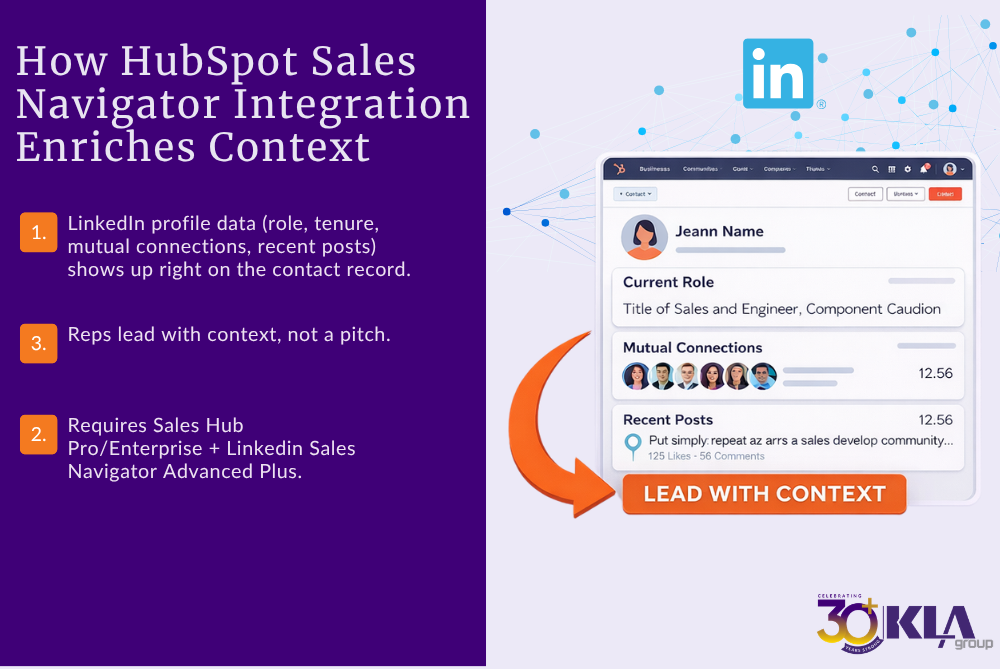
To access these details, you need Sales Hub Professional or Enterprise and a LinkedIn Sales Navigator Advanced Plus subscription. Without it, reps switch between platforms, which slows them down and breaks consistency. Also, LinkedIn messages (InMail and DMs) aren’t logged automatically, so your team needs a clear process to capture relevant conversations.
Seeing a prospect’s post about supply chain challenges allows your rep to start with a relevant comment instead of a generic opener. This level of personalization reflects the prospect’s priorities, not your sales agenda.
When these interactions are captured in HubSpot, you gain visibility into what’s working. You can see which conversations turn into meetings, which meetings turn into opportunities, and how outreach contributes to pipeline.
3. How Does HubSpot Turn Engagement Into Prioritized Follow-Up?
Capturing social media engagement is just the start. To ensure follow up happens at the right moment, use HubSpot’s lead scoring and workflow tools to assign point values to social actions such as 10 points for a comment and 20 for a direct message. When a contact crosses your threshold, HubSpot automatically creates a task for a rep to follow up.
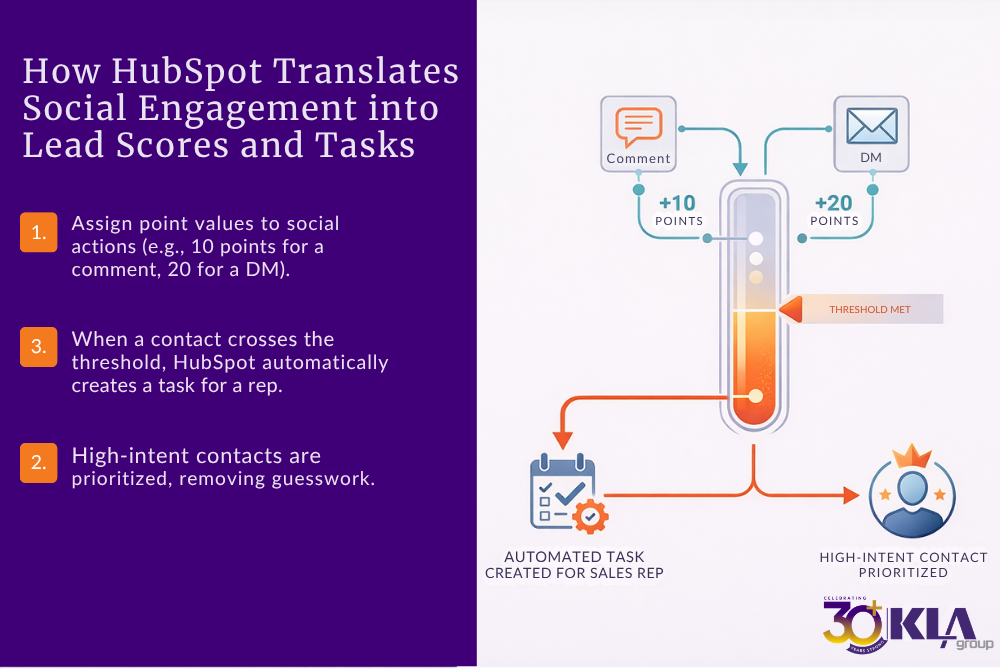
This approach removes guesswork. High-intent contacts are prioritized, follow-up becomes consistent, and reps can respond with context tied to what the prospect engaged with. Instead of reacting to everything, your team is working from a clear set of signals.
It’s how you shift from counting clicks to identifying what’s actually creating opportunities and pipeline movement. With the right structure in place, HubSpot also allows you to trace pipeline back to specific campaigns, channels and content giving you visibility into what’s driving real results.
Ready to connect your social engagement to revenue? [Try HubSpot CRM for free] to start tracking your pipeline attribution today.
4. How Does HubSpot Connect Engagement to Opportunities and Deals?
Leaders care about revenue, not impressions. HubSpot’s attribution reporting lets you connect engagement to outcomes using three report types: contact create, deal create and revenue attribution that show which marketing efforts drove contacts, deals and won revenue.
To build these reports:
- Connect your channels. Link all social accounts and ad platforms so HubSpot captures interactions like ad clicks, form submissions and page views.
- Track new contacts. Use a contact create report to see which posts or ads generate new contacts.
- Measure deals. Run a deal create report (available in Marketing Hub Enterprise) to identify which engagements become deals.
- Allocate revenue. Use a revenue attribution report to distribute revenue credit across every touch along the buyer’s journey.
These multi‑touch models reveal whether comments, ads or webinars have the biggest impact on revenue and help you justify investments in the channels that work best.
5. How Does AI in HubSpot Identify High-Intent Opportunities Faster?
AI highlights the hottest opportunities. HubSpot AI uses generative and predictive intelligence to spot high intent signals. It looks at your past social performance, company details and audience behavior to suggest posts, timing and who to contact.
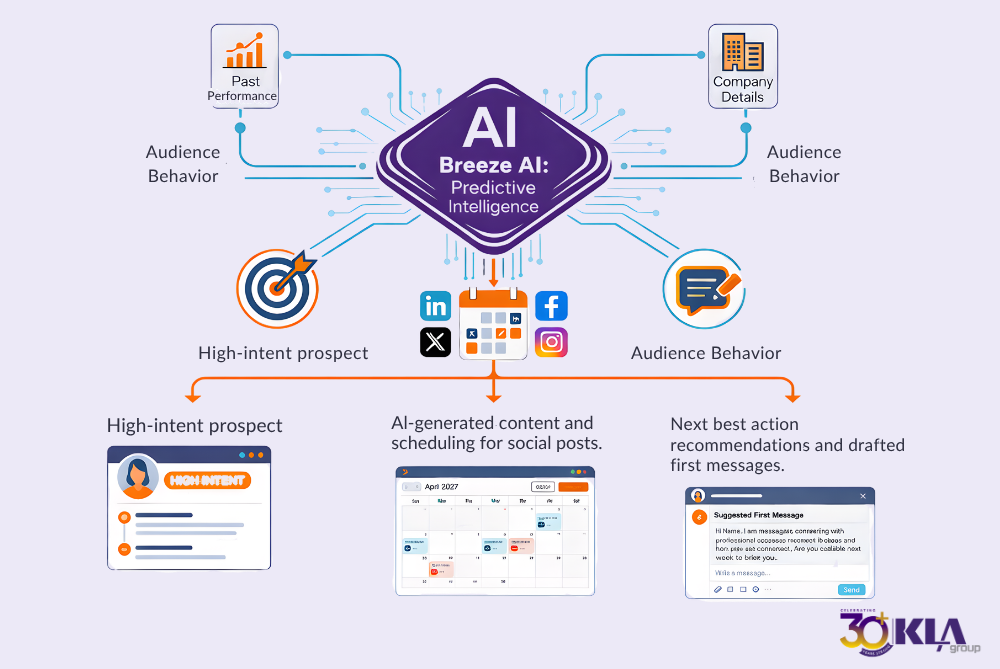
Saving time by:
- AI assisted content and scheduling: Breeze can take a longform article and create multiple social posts, then schedule them at the right times for your audience.
- Next best action recommendations: It analyses interactions to highlight which prospects are most likely to convert and can even draft a first message to them.
Remember, AI doesn’t replace human involvement, it speeds up execution. You still need to review content and ensure it fits your revenue generation system.
6. How Do You Align Sales and Marketing Around This System?
Alignment drives revenue, but it doesn’t come from meetings or shared goals. It comes from how your system is set up and used every day.
When social engagement flows into HubSpot and triggers follow-up, sales and marketing are no longer working separately. They’re working from the same data and responding to the same signals.
Focus on three areas:
Shared visibility
Both teams should see the same information in HubSpot—what the contact engaged with, what triggered follow-up, and how that interaction is progressing. This removes guesswork and keeps conversations consistent.
Defined follow-up actions
Your team needs clear rules for what happens next. When a contact reaches a lead score threshold or engages with key content, a task should be created automatically, so reps know when to act and what to reference.
Consistent use of the system
The system only works if your team uses it. That means logging relevant interactions, responding to notifications, and following the process you’ve built. Without that consistency, engagement stays as activity and never turns into opportunity.
You’ll also know when your current setup isn’t enough. If you can’t track engagement across channels, trigger follow-up, or connect activity to pipeline, it’s time to move beyond Free or Starter.
Marketing Hub Professional enables Social Inbox and engagement tracking. Marketing Hub Enterprise adds attribution reporting and deal-level visibility. When these pieces are in place, your team can see what’s working and act on it.
What Should You See When This Is Working?
When your HubSpot CRM is connected to social engagement and used consistently, you start to see changes pretty quickly. Not in activity, but in how work gets done across sales and marketing.
Here’s what that looks like:
Sales conversations are easier to start
Your team isn’t reaching out cold. They have context from what the prospect engaged with, so conversations start with something relevant instead of a generic opener.
Follow-up becomes more consistent
Instead of relying on reps to remember, HubSpot triggers the next step based on engagement. That removes gaps and keeps opportunities moving.
You can see where opportunities are coming from
You’re no longer guessing which posts or campaigns are working. You can trace interactions back to conversations and deals, not just clicks or impressions.
Marketing connects to what sales is doing
Marketing isn’t just producing content. You can see how that content shows up in conversations, follow-up, and pipeline movement.
Your CRM shows movement, not just activity
Instead of a static database, you can see how contacts engage over time, how deals progress, and where things slow down.
From Social Media Activity to Revenue
Social media isn’t a lead source by itself; it’s a signal. When you capture those signals in HubSpot, share them with your team and track them through to revenue; you know what works and what doesn’t.
Most companies wire up their tools but never connect execution.
If you’re ready to turn your HubSpot CRM into a true revenue engine, KLA Group can help you connect the dots and turn social media engagement into measurable pipeline.
Ready to connect your social engagement to revenue? [Try HubSpot CRM for free] to start tracking your pipeline attribution today.
FAQs: HubSpot Social Engagement, Pipeline & Revenue
Quick answers to common questions about how HubSpot captures social engagement and connects it to sales conversations, pipeline, and revenue.
How does HubSpot CRM capture social media engagement automatically?
HubSpot captures social engagement through its Social Inbox, which pulls comments, mentions, and messages into one place and logs them on the contact record. This gives your team immediate visibility into who is engaging and what they interacted with.
How does HubSpot turn social engagement into sales conversations?
HubSpot connects engagement to contact records and enriches them with tools like Sales Navigator. This gives reps context, such as recent posts or interactions, so they can start relevant conversations instead of generic outreach.
How do you turn social engagement into actionable follow-up in HubSpot?
You use lead scoring and workflows to assign value to interactions. When a contact reaches a defined threshold, HubSpot triggers a task so sales knows when to follow up and what to reference.
How does HubSpot connect social engagement to pipeline and revenue?
HubSpot uses attribution reporting, contact create, deal create, and revenue attribution to track how social interactions contribute to opportunities, deals, and closed revenue across the pipeline.
How does AI in HubSpot help identify high-intent prospects from social engagement?
HubSpot’s AI analyzes engagement patterns, company data, and past performance to highlight which contacts are most likely to convert and recommend next actions for sales and marketing teams.
Why doesn’t social media engagement automatically turn into pipeline?
Engagement alone doesn’t create opportunities. Without capturing interactions, scoring them, triggering follow-up, and tracking outcomes in HubSpot, social activity stays disconnected from sales execution.
What does it look like when HubSpot is successfully connecting engagement to pipeline?
You’ll see consistent follow-up, clearer visibility into what’s driving opportunities, and the ability to trace interactions from first engagement through to deals and revenue.
About the Author
Revenue generator and founder of KLA Group, Kendra Lee helps small and mid-sized companies grow revenue by getting seen, getting heard, and getting traction with sales, marketing, and AI strategies that cut through the noise. She’s the author of The Sales Magnet with her third book, From Chaos To Revenue, coming 2026.
Affiliate Disclosure:
KLA Group is a HubSpot Solutions Partner. Some of the links on this page are affiliate links. If you click through and sign up for HubSpot products, KLA Group may receive a commission at no extra cost to you. We recommend only those tools we believe add measurable value to your business.
Read More Related Articles